Short answer: The right Harvest Forecast alternative depends on one choice: keep Harvest for time tracking, or replace both tools. If you keep Harvest, Operating syncs with it on every plan: clients and projects both ways, time entries daily or on demand. Runn pulls Harvest projects, people and timesheets once a day, but only on its quote-only Advanced plan. Float and Resource Guru are simple and cheap, and connect to Harvest only through Zapier. If you replace both, Productive and Operating cover time tracking, scheduling and invoicing in one tool.
Forecast itself costs $5 per person per month billed yearly ($6.25 monthly), and everyone who schedules or is scheduled counts as a paid seat. We checked every price on the vendor's own site on October 27, 2026; Parallax publishes none, so its figure comes from G2.
TL;DR
- Harvest Forecast costs $5 per person per month billed yearly ($6.25 monthly), on top of Harvest Teams at $9 ($11). The two are billed separately.
- For 30 people on yearly billing, Harvest plus Forecast comes to $5,040 a year, before Harvest's usage charges.
- To keep Harvest, Operating syncs with it on every plan, from $13, with planned vs actual reports from $17. Runn also syncs with Harvest, but only on its quote-only Advanced plan.
- To replace both, look at Productive (from $10, placeholders from $25) or Operating (Plan & Track $17, Full Suite $21).
- Float (from $7) and Resource Guru (from $5) are simple schedulers with no built-in Harvest integration.
Scheduling is the easy part
Forecast plans time. Operating carries the plan through to utilization, project margin and invoicing, and turns CRM deals into tentative projects. Prefer to keep tracking time in Harvest? The integration keeps clients and projects in sync both ways.
Harvest Forecast (also called Forecast by Harvest) is a visual scheduler that sits next to Harvest time tracking. For a small team that only needs to see who works on what next week, it does the job. Firms start looking elsewhere when they need reports, project money, a plan that connects to sales, or when the Harvest bill changes.
Harvest is now owned by Bending Spoons, and its time tracking plans have moved to seat prices plus usage charges, billed either as used (Flex) or at a fixed price (Unlimited). Forecast is still priced per person and billed separately. Below, we compare six tools on what they cost for your team, how they work with Harvest, and what they do better or worse than Forecast.
Disclosure: Operating (operating.app) makes one of these tools. Every price below, ours included, comes from the vendor's own public page, so you can check it the same way. The one exception is Parallax, which publishes no price.
How much does Harvest Forecast cost?
Harvest Forecast costs $5 per person per month on yearly billing, or $6.25 on monthly billing. It's billed separately from Harvest time tracking, which costs $9 per seat per month on the Teams plan ($11 monthly). The seat rule is the part people miss. Both the people who schedule and the people being scheduled count, including people who never sign in. Placeholders are free but capped: every account gets 2, plus 1 more for every 4 people.
For a 30-person team on yearly billing, that's $1,800 a year for Forecast and $3,240 for Harvest Teams, so $5,040 together. On Flex billing, Harvest also charges for usage above a free allowance (extra invoices, projects, clients and tasks); Unlimited adds a fixed usage fee instead. Harvest doesn't publish those rates, so the totals above leave them out.
Harvest Forecast vs the alternatives: price, seats and Harvest link
| Tool | Plan | Per person / month (yearly, monthly) | Who counts as a seat | Works with Harvest | G2 |
|---|---|---|---|---|---|
| Harvest Forecast | Forecast | $5, $6.25 | Everyone who schedules or is scheduled, login or not | Native, same company | 4.1 |
| Operating | Planning (planned vs actual on Plan & Track, $17, $19) | $13, $15 | All users plus anyone scheduled; scheduled-only seats $11, $13 | Yes, every plan: clients and projects both ways, time entries daily or on demand | 4.7 |
| Float | Starter (Pro $12, $14) | $7, $8.50 | People on the schedule; guests are free | Through Zapier only | 4.3 |
| Resource Guru | Grasshopper (Blackbelt $8, Master $12) | $5, $6 | Everyone added, login or not | Through Zapier only (clients and projects, no hours) | 4.6 |
| Runn | Standard (Harvest sync needs Advanced, quote) | $11, $13 | Scheduled resources, 20-seat minimum | Advanced plan only: one-way daily sync | 4.5 |
| Productive | Essential (placeholders from Professional, $25) | $10, $12 | Users, 3-seat minimum | One-time import | 4.6 |
| Parallax | Quote only | From $45 (G2, 2025 data) | Scales by resources managed, 15 to 1,500+ | Yes, per Parallax; no field list published | 4.7 |
USD list prices checked on each vendor's pricing page, October 27, 2026. G2 star ratings as of October 2026. Parallax publishes no price; the G2 figure is third-party.
Why teams look for a Harvest Forecast alternative
Four reasons come up most. Two come from user reviews, and two from how the products work today.
Thin reporting. "Non-existent reporting means you need to export a CSV and create your own reports," wrote a program manager in a 2019 Capterra review. Another reviewer said they keep longer-term forecasts in spreadsheets. To be fair, those reviews are from 2018 and 2019. Forecast does compare scheduled hours with tracked hours for projects linked to Harvest, and it now supports task-level scheduling.
A loose link to Harvest. Forecast and Harvest are two apps with separate bills. One Harvest account connects to one Forecast account, and people you add in Forecast can't be synced back into Harvest. Scheduled-versus-tracked numbers only work for projects you've linked.
No public API. Harvest's help center says Forecast doesn't have a public API; there's an undocumented one, but Harvest doesn't support it. So getting the schedule into a BI tool, a data warehouse or an AI assistant means exporting files by hand or relying on that unsupported API.
The Harvest bill. The move to usage charges hit some teams hard at renewal in 2026. Subscription Insider reported one UK consultancy's monthly Harvest bill rising about 1,500%. That's about Harvest, not Forecast, but it pushes teams to rethink the whole pair. Our post on Harvest alternatives after the price increase covers the time tracking side.
What people like is just as clear: the timeline is simple and quick to read, and Forecast talks to Harvest with little setup. If that's all you need, stay put.
Keep Harvest or replace both?
Keep Harvest if your team is happy tracking time there and you send invoices from it. Then you only need a planner that reads Harvest's hours. Replace both if you want plan, actual hours and money in one place, or if Harvest's usage charges make the pair too expensive. This table maps common situations to the tools worth a look.
| Your situation | Path | Look at |
|---|---|---|
| Harvest works; you want a better scheduler with Harvest hours in it | Keep Harvest | Operating, or Runn on its Advanced plan |
| You need planned vs actual by person, project budgets and utilization | Keep Harvest | Operating, or Runn on its Advanced plan |
| You want the cheapest simple scheduler and can do without a built-in Harvest link | Keep Harvest | Resource Guru, Float |
| You want to stop paying Harvest's usage charges | Replace both | Operating, Productive |
| You run an agency and want tasks and projects in the same tool | Replace both | Productive |
| You want a revenue forecasting layer over the tools you already have | Keep your stack | Parallax |
Prices and Harvest links are in the table above.
The 6 best Harvest Forecast alternatives
Each tool gets the same checks: who it fits, what it costs, how it works with Harvest, what it does better than Forecast, and where it falls short. We start with Operating, our product, then go from the closest Forecast replacement to the broadest.
1. Operating: for consulting and IT services firms
Best for: consulting, IT services and professional services firms that staff projects by skill and need the plan to reach margin and invoicing. Price: Planning $13 per person per month yearly ($15 monthly), Plan & Track $17 ($19) with timesheets and planned vs actual reports, Full Suite $21 ($23) with invoicing. Scheduled-only seats bill at $11 ($13). G2: 4.7.
How it works with Harvest: the integration is on every plan. Clients and projects sync both ways. Time entries, people and tasks come in from Harvest daily or on demand. When you confirm a staffing plan, Operating creates the project in Harvest and puts the team and project manager on it. You can also pull your full Harvest history in, 90 days at a time. The Harvest integration page shows what syncs and in which direction.
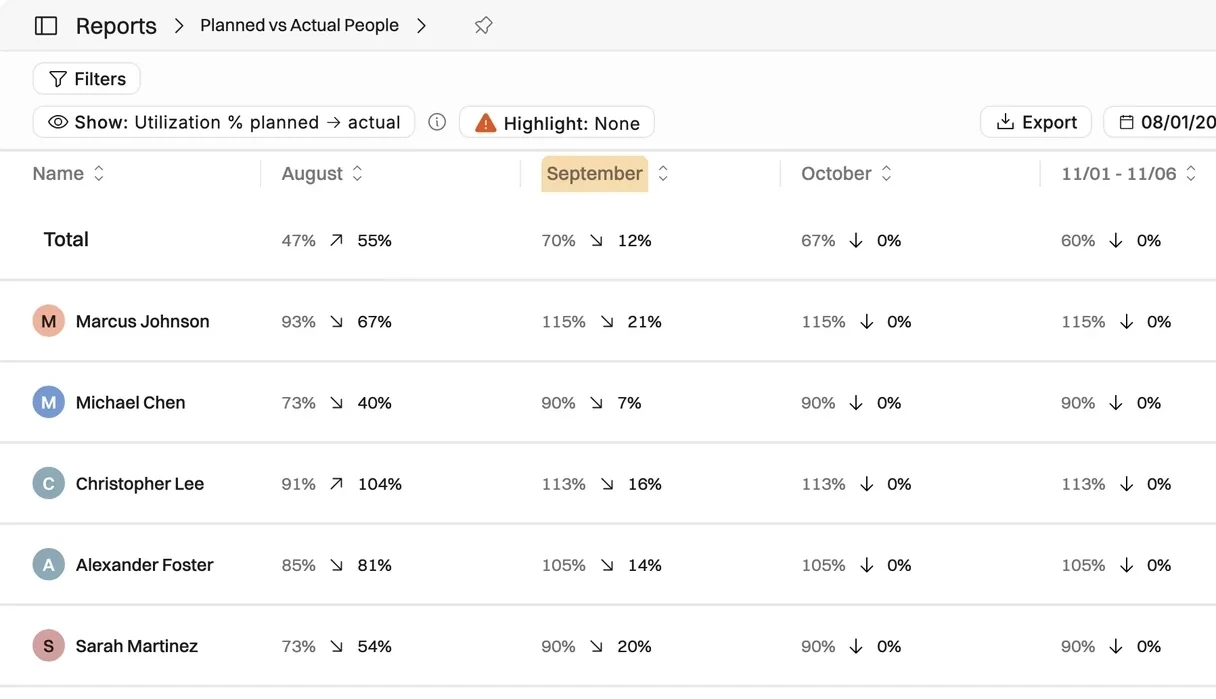
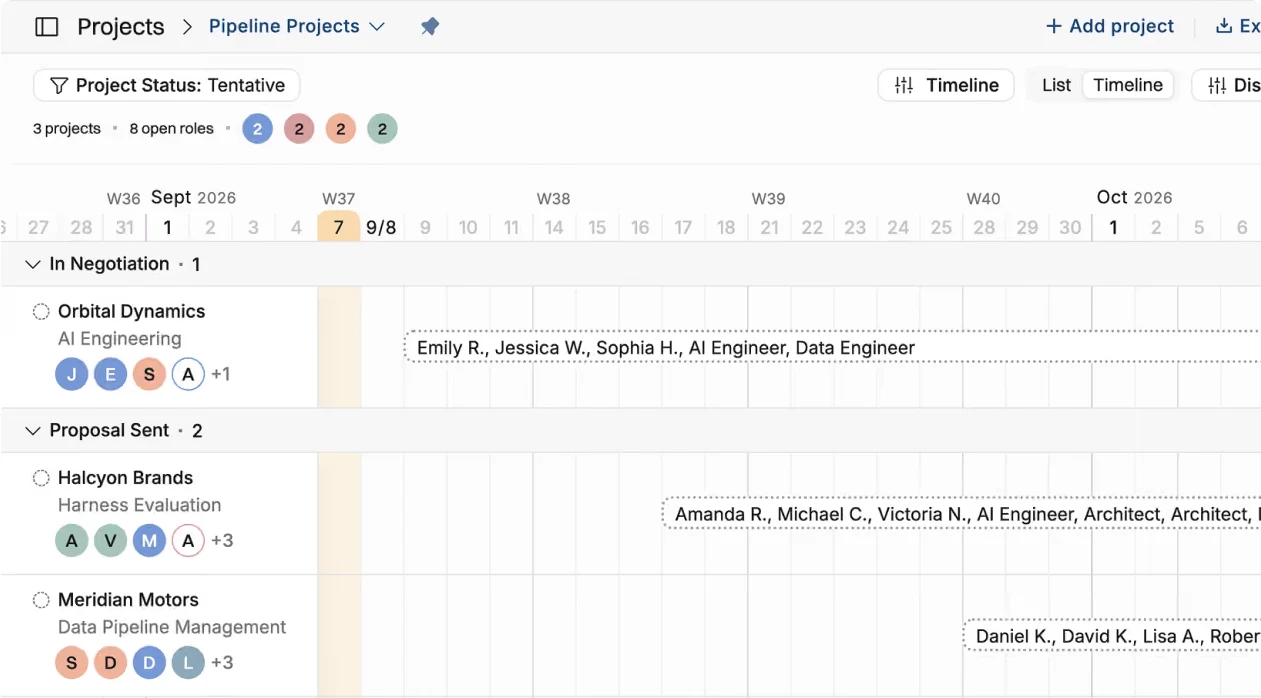
What stands out: staffing suggestions based on skills, open positions for roles you haven't filled, and tentative projects created from HubSpot, Salesforce or Pipedrive deals. It adds project budgets, rate cards, a planned vs actual report and a revenue forecast next to the capacity forecast. Its MCP server lets AI assistants such as Claude or ChatGPT read the plan and write allocations back.
Where it falls short: it isn't a task manager, so teams usually keep a task tool such as Linear, Jira or Asana next to it. It does more than a scheduler, so setup takes longer than Forecast's. Onboarding help is included.
Worth twenty minutes?
We'll walk through it on your own staffing and utilization numbers, not a demo dataset. Setup takes a few weeks, and we help move the data across.
2. Float: a polished visual scheduler
Best for: agencies and studios that want fast drag-and-drop scheduling. Price: Starter $7 per scheduled person per month yearly ($8.50 monthly), Pro $12 ($14). You only pay for people on the schedule; guests are free. G2: 4.3.
How it works with Harvest: there's no built-in integration. Float's help center documents a Zapier connection for Harvest clients and projects, and Zapier has a template that logs Harvest time entries in Float. Check your Zapier plan's limits before you rely on it. What stands out: tentative status at project, phase and allocation level, and its own time tracking on Pro. Pro also gives you 5 placeholders (Starter has 1). Where it falls short: Harvest data only arrives through Zapier, and there's no invoicing.
3. Resource Guru: the cheapest simple booking tool
Best for: small teams that book people, rooms and equipment and want to spend as little as possible. Price: Grasshopper $5 per person per month yearly ($6 monthly), Blackbelt $8 ($9.60), Master $12 ($14.40). Everyone you add counts, login or not. G2: 4.6.
How it works with Harvest: there's no native integration. Zapier can move clients and projects between the two, but not hours. What stands out: tentative bookings on every plan, and bookings for rooms and equipment as well as people. From Blackbelt, it has its own timesheets and a forecast vs actuals view. Where it falls short: if your team keeps tracking time in Harvest, those hours stay out of the plan.
4. Runn: capacity planning, with a Harvest sync on its top plan
Best for: teams that want scheduling plus capacity forecasting, and can work with a 20-seat minimum. Price: Lite $7 per resource per month yearly ($9 monthly), Standard $11 ($13), Advanced on quote. Plans start at 20 resource seats. G2: 4.5.
How it works with Harvest: a one-way, daily sync brings in Harvest projects, people and timesheets, so actual hours land within 24 hours. Deletions and rates don't sync. Runn's pricing page says the Harvest integration is available on request on the Advanced plan only, which has no public price.
What stands out: unlimited placeholders on every plan, and planning built around capacity forecasts. Where it falls short: to keep Harvest you need the quote-only Advanced plan, the 20-seat minimum makes it costly for small teams, and there's no invoicing.
5. Productive: replace Harvest and Forecast with one agency tool
Best for: agencies that want projects, tasks, time, scheduling and invoicing in one place. Price: Essential $10 per user per month yearly ($12 monthly), Professional $25 ($29), Ultimate on quote. Minimum 3 seats. G2: 4.6.
How it works with Harvest: a one-time import moves users, projects, tasks, cost rates, time entries, companies and contacts. By default it takes projects edited in the last 365 days and time entries from the last 3 months; invoices and expenses don't come across, and Productive offers a custom import for older data on request. What stands out: budgets, task management and invoicing in the same tool. Where it falls short: placeholders start on Professional, so the real price for Forecast-style planning is $25, not $10. It's also a lot more tool than a scheduler.
6. Parallax: a forecasting layer over your stack
Best for: agencies and consultancies that want staffing tied to revenue forecasts on top of the tools they already use. Price: quote only. Parallax says pricing scales by resources managed, from 15 to 1,500 or more; G2 listed it from $45 per user per month in 2025. G2: 4.7.
How it works with Harvest: Parallax says it integrates with your Harvest data, and its free Harvest utilization report runs on it, but it doesn't publish a field list. Ask what syncs before you sign. What stands out: revenue and capacity forecasting in one view. Where it falls short: no public price, so you'll need to talk to sales, and no time tracking of its own.
What about Forecast.app? It's a different product with a similar name. Accelo bought Forecast in July 2025, and forecast.app now redirects to Accelo, so we left it off this list.
How to move off Harvest Forecast
Plan the move around Harvest, not around Forecast. Forecast has no public API, so the schedule comes across as a CSV export, while clients, projects and people should come from Harvest through the new tool's own connector.
Start by connecting the new tool to Harvest, so people and projects arrive from your system of record. Then rebuild the next 8 to 12 weeks of allocations from the Forecast export, not the whole history. Turn your Forecast placeholders into open roles. Run both tools side by side for a couple of weeks, then switch off Forecast.
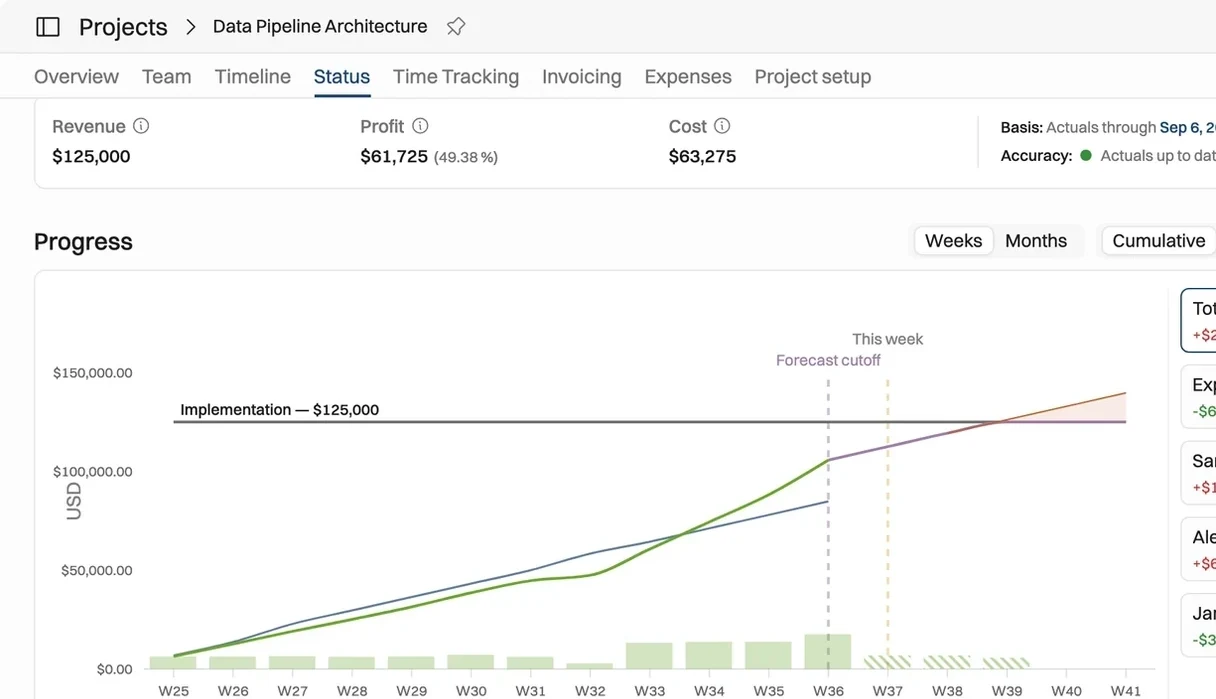
One billing trap: archiving or deleting people in Forecast doesn't free their seats. Remove seats in billing before the next renewal. Tool by tool: Operating can import your full Harvest history in 90-day windows. Runn's actuals arrive within 24 hours once the integration is on. Productive's standard import covers recent projects and the last 3 months of time entries.
Recommended reading
Looking at a full PSA instead? See the best PSA software for consulting firms.
Harvest Forecast FAQ
What is the best Harvest Forecast alternative?
It depends on whether you keep Harvest. To keep it, Operating syncs with Harvest on every plan and suits consulting and IT services firms that need budgets, utilization and invoicing. Runn also syncs, but only on its quote-only Advanced plan. To replace both, look at Operating or Productive. For the cheapest simple scheduler, Resource Guru or Float, though both connect to Harvest only through Zapier.
Can I keep Harvest time tracking and replace only Forecast?
Yes. Operating syncs clients and projects both ways and pulls time entries daily or on demand, on every plan. Runn pulls Harvest projects, people and timesheets once a day on its Advanced plan. Parallax says it integrates with Harvest data but doesn't publish a field list. Float and Resource Guru connect only through Zapier.
How much does Harvest Forecast cost per person?
$5 per person per month on yearly billing, or $6.25 on monthly billing, as of October 2026. Everyone who schedules or is scheduled counts, even people who never sign in. Forecast is billed separately from Harvest time tracking.
Does Harvest Forecast compare scheduled time against tracked time?
Yes, for projects linked to Harvest. Forecast shows the difference between scheduled and tracked hours and a weekly or monthly actuals view, but only for linked projects.
Does Harvest Forecast have an API?
Not a public one. Harvest's help center says Forecast doesn't currently have a public API. An undocumented API exists, but Harvest doesn't support it, so most teams move schedule data out through exports.
Is Harvest Forecast being discontinued?
There's no sign of it as of October 2026. Forecast still has its own pricing page and is billed separately from Harvest, and it now supports task-level scheduling.
Did Harvest's usage pricing change affect Forecast?
The usage charges apply to Harvest time tracking plans. Forecast is still priced per person and billed separately. Teams that use both feel the change through the Harvest bill.
Who owns Harvest and Forecast now?
Bending Spoons. The Harvest and Forecast websites carry a Bending Spoons Operations S.p.A. copyright line.
How we compared these tools
On October 27, 2026 we checked each vendor's own pricing page, plan comparison and help center. Prices are USD list prices per person per month. Harvest link details come from each vendor's integration documentation. Review quotes come from public review pages, and G2 star ratings are as shown in October 2026. Totals leave out Harvest's usage charges because Harvest doesn't publish the rates.
Sources: Harvest Forecast pricing, Harvest pricing, Harvest pricing plans (help center), Forecast placeholders, Forecast scheduled vs tracked, Forecast task scheduling, Forecast API, Subscription Insider on Harvest renewals, Runn pricing, Runn Harvest integration, Float pricing, Float and Harvest via Zapier, Resource Guru pricing, Resource Guru and Harvest on Zapier, Productive pricing, Productive Harvest import, Parallax pricing, Parallax on G2, Parallax and Harvest, Accelo and Forecast, Operating pricing, Operating Harvest integration, Forecast reviews on Capterra, Forecast on G2. All accessed October 27, 2026.